Digital Bulletin Board for Events, Jobs & Local Deals

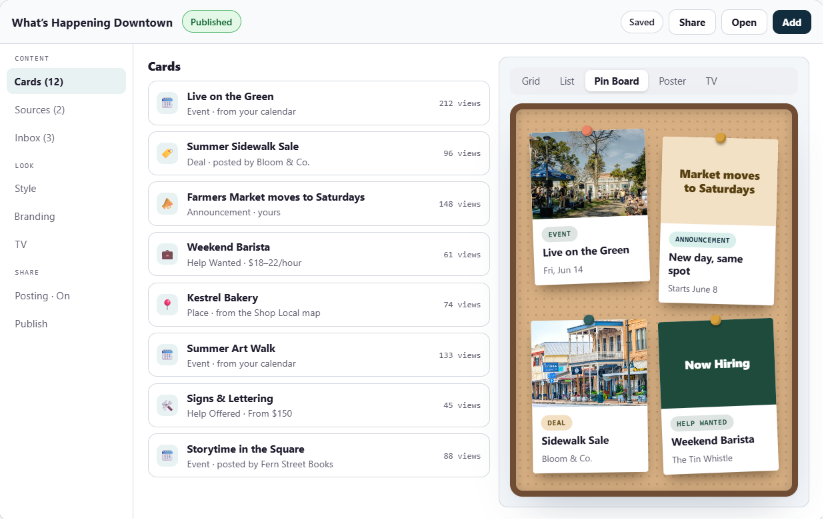
The community bulletin board, reimagined. Flyers, classifieds, and help wanted posts in one place, shown five ways: a pin board, poster wall, grid, list, or TV slideshow. Your community posts, you approve, and it all comes down on its own.
What Is a Digital Bulletin Board?

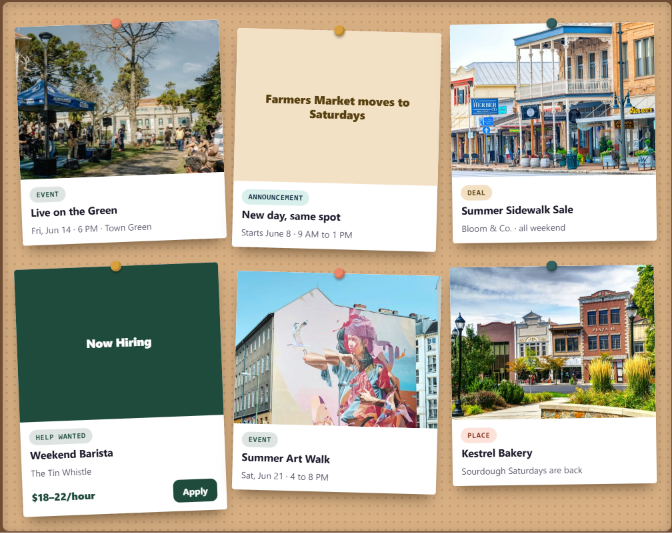
A digital bulletin board is the cork board by the coffee shop door, rebuilt for how your town finds things now. Events, classifieds, job postings, and deals all live on one board. Businesses and neighbors post to it, you decide what goes up, and old posts take themselves down.

You build the board once, then choose how it looks in each place you share it: a pin board on your homepage, a poster wall on your events page, a list for job listings, or a slideshow on the TV in the visitor center.


How a Proxi Board Works

Step 1: Pick a template

What’s Happening, Upcoming Events, Downtown Deals, or Jobs & Services. It fills in the name, the categories, and who can post.

Step 2: Add cards, or crowdsource posts from your community.

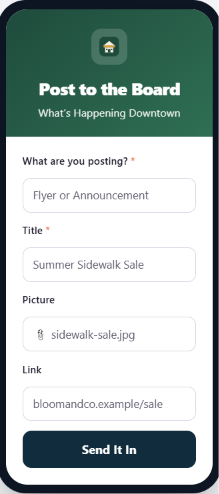
Post your own, connect your event calendar or a map, and share a posting form with your businesses and neighbors.

Step 3: Approve what comes in.

Every post waits in your Inbox for your OK. Businesses you trust can post straight to the board.

Step 4: Choose a look and share it.

Paste it on your website, open it on a TV, or share the link. Each place can use a different look.

Use Cases

Proxi's Board feature meets you where you're at.

Community Bulletin Board

Flyers, announcements, and notices from around town, pinned up like the real thing.

Local Job Board

Help Wanted listings with pay and an Apply button, posted by the shops downtown.

Classified Ads and Local Services

Help Offered listings from sign painters, bookkeepers, photographers, and more, each with a Get in Touch button.

Digital Signage for Your Lobby TV

A rotating slideshow with a scan code on every slide. Open the link on any screen.

Community Events Board

Connect your calendar and upcoming events show up as posters on their own.

Downtown Deals and Specials

Businesses post their own offers, and you approve them.

Sponsor Thank You Wall

Sponsor logos and a thank-you on a loop for the people who make it possible.

Visitor Center Photo Slideshow

Your favorite photos of town playing in the window or the lobby.
Go Further with Your Digital Bulletin Board

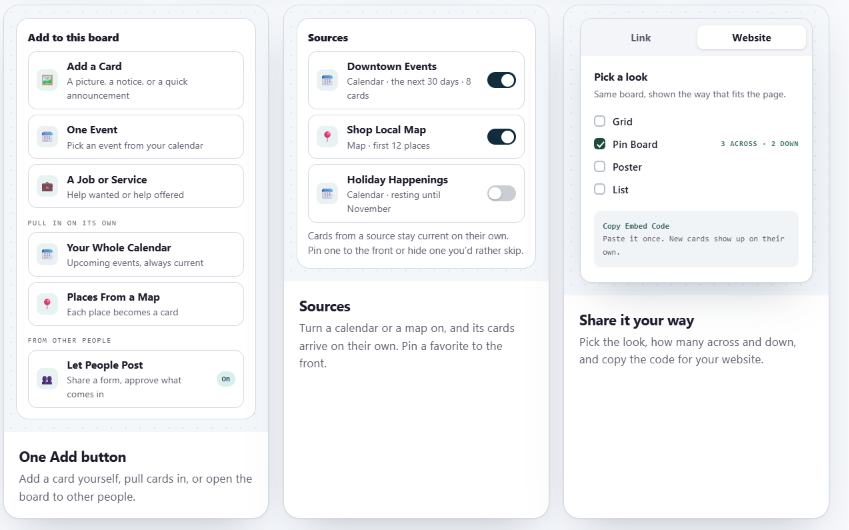
Five looks, one board. Pin board, poster wall, grid, list, or TV slideshow. The same cards every time, so you only update one place.

‍It fills itself. Connect your calendar or a map, and upcoming events and places arrive as cards, always current.

‍Your businesses post too. Share one form, or let businesses post from their own page. You decide what goes up.

‍A scan code on every TV slide. Someone walking by the window can open that event, deal, or job on their phone.

‍Listings that stay current. Cards come down when their date passes. Job posters get a reminder a week before closing, with one tap to keep it open or mark it filled.

‍See what gets noticed. Views, scans, and taps on every card, ready for your board report.
Dashboard mockupiPhone mockup

The Affordable Alternative to Job Board and Digital Signage Software

The old way

With a Proxi Board

Job board software starting at $149/month
Jobs & Services is part of your plan
Digital signage at $9 to $10 per screen each month, plus designing the slides
A TV link that builds its own slides from your board
Retyping flyers and emails people send you
A posting form plus an approval Inbox
Posts that stay up long after the event
Cards that come down on their own
One layout everywhere
Five looks, chosen for each place you share it
No idea who saw it
Views, scans, and taps on every card

See a Live Local Job Board

Browse the Jobs & Services board on our Snoqualmie Main Street demo site. Help Wanted on one side, Help Offered on the other, all on one board.

Frequently Asked Questions

What is a digital bulletin board?
A digital bulletin board is an online version of the community cork board. Events, classifieds, job postings, and deals live on one board that you can show on your website, a TV, or people’s phones.
Can I add a digital bulletin board to my website?
Yes. Pick a look, choose how many cards across and down, and paste the embed code once. It works on Webflow, WordPress, Squarespace, Wix, or any site that accepts an embed. New cards show up on their own after that.
What looks can I choose from?
Five: grid, list, pin board, poster wall, and TV slideshow. You build the board once and pick a different look for each place you share it.
Is there a free version?
Every Proxi workspace can make a board. Some looks, and cards that arrive on their own, are part of paid plans. Every plan includes a 7-day free trial.
How much does it cost?
Boards are included in Proxi Pro. See our Pricing page for more information.
Can I use it as a job board?
Yes. The Jobs & Services template puts Help Wanted and Help Offered side by side, with an Apply or Get in Touch button on every listing.
Can I control what goes up?
Yes. Every post waits for your OK before it shows. If there are businesses you trust, you can let their posts go straight up.
Can I use it as digital signage as on a TV or kiosk?
Yes. Open the TV link on any screen with a browser and your board plays as a slideshow. Every slide has a scan code, so passersby can open it on their phone.
Do I have to post everything myself?
No. Connect your event calendar or a map and those cards arrive on their own. Share the posting form and your businesses can post too.
What happens when an event is over or a job is filled?
Cards come down on their own once their date passes. For jobs and services, the person who posted gets an email a week before the listing closes, with one tap to keep it open or mark it filled.

Start Your Digital Bulletin Board

You set up the board. Your community fills it.